

Arduino & Edge AI: How Built-In Machine Learning Is Transforming Next-Gen Applications

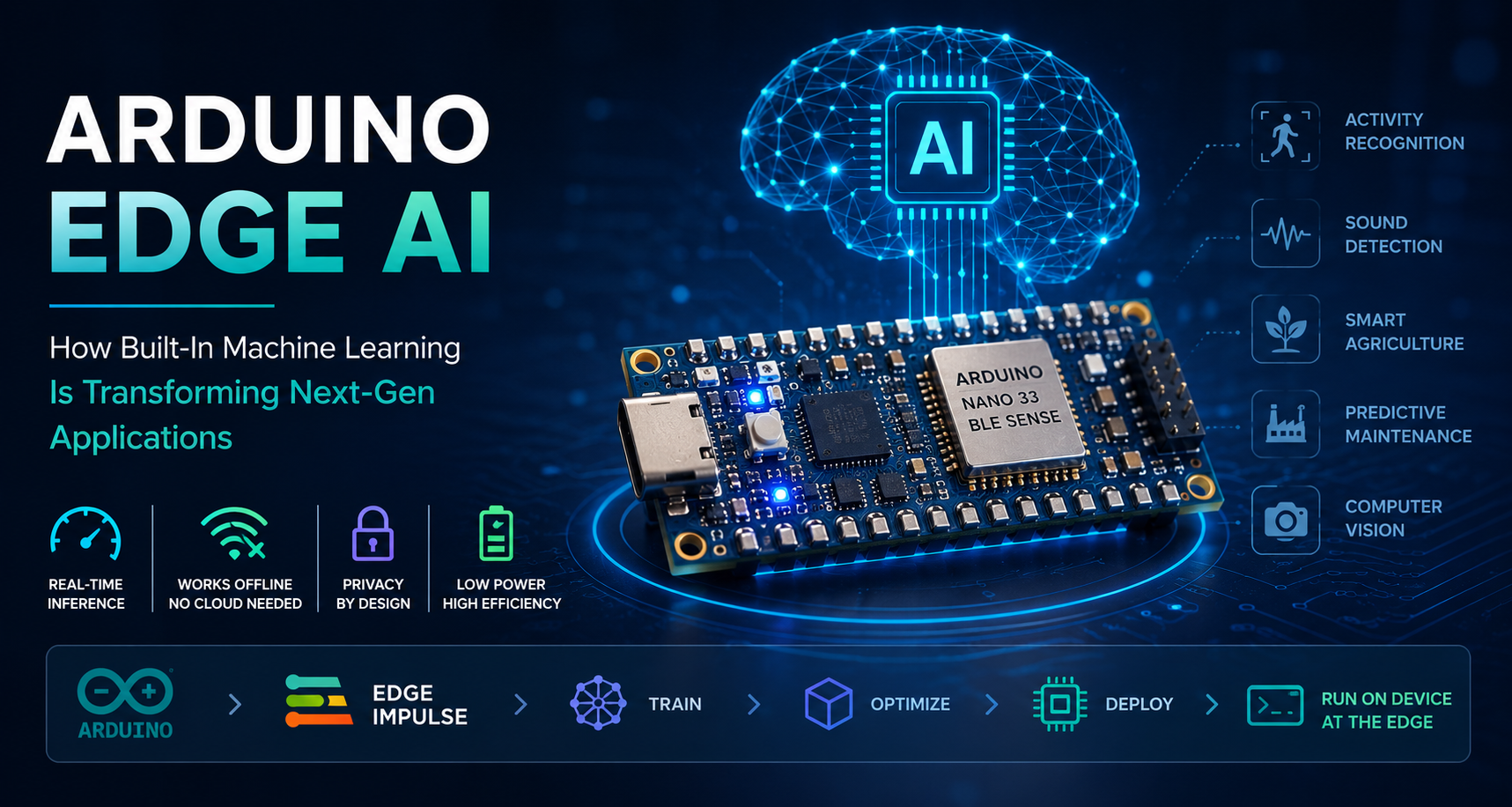
Arduino & Edge AI: How Built-In Machine Learning Is Transforming Next-Gen Applications
For the longest time, machine learning was a cloud thing. You collected data, sent it to a server, ran your model, and received a result. Fast, powerful, expensive, dependent on connectivity, and fundamentally unsuited to the billions of small, low-power devices that make up the real world of embedded electronics.
That is changing — fast. Arduino Edge AI is at the forefront of a quiet revolution in how intelligence gets deployed in hardware. The idea is simple but profound: instead of sending data to the cloud for processing, you run the machine learning model directly on the microcontroller itself, right where the data is generated. No internet required. No latency. No privacy leaks. Just a tiny chip making smart decisions in real time.
This is the world of TinyML — machine learning on microcontrollers — and Arduino has become one of its most accessible and exciting platforms. In this post, we will explore what Arduino Edge AI actually means, which boards make it possible, how the toolchain works, and what remarkable things are already being built with it around the world. Explore our full range of Arduino development boards at Indus Technologies.
"Edge AI doesn't make the cloud obsolete — it makes intelligence available everywhere the cloud can't reach. And that turns out to be most of the physical world."
Table of Contents
1. What Is Edge AI — and Why Does It Matter?
Edge AI refers to running artificial intelligence algorithms — particularly inference from pre-trained machine learning models — on local devices ("the edge") rather than on remote servers ("the cloud").
The "edge" in Edge AI is everything that isn't a data centre: a factory sensor, a wearable health monitor, a smart camera at a doorbell, an agricultural drone, a quality control system on a production line, a hospital patient monitor. These devices generate enormous volumes of data — but most of that data never needs to leave the device if the device is smart enough to interpret it locally.
Why does running AI at the edge matter so much? Several compelling reasons:
- Latency: Cloud round-trips take 50–500ms. On-device inference takes microseconds to milliseconds. For real-time applications — gesture recognition, anomaly detection, machine vision — that gap is the difference between working and not working.
- Connectivity independence: Factories, agricultural fields, underground infrastructure, remote sensors — countless environments have poor or no internet connectivity. Edge AI makes intelligence possible anywhere.
- Privacy: Data that never leaves the device cannot be intercepted, stored without consent, or misused. Edge AI is privacy-preserving by architecture.
- Power and cost: Transmitting data continuously to the cloud is expensive in bandwidth, infrastructure, and battery consumption. Processing locally uses a fraction of the energy.
- Reliability: An edge device that does not depend on cloud connectivity does not fail when the connection goes down.
Arduino Edge AI sits at the intersection of these advantages and the world's most widely loved microcontroller ecosystem.
⚡ Did you know? By 2030, over 1 trillion IoT devices are projected to be deployed globally. Even if a tiny fraction of these devices run on-device AI inference, the scale of impact is staggering — and most of it will happen at the edge, not the cloud.
2. What Is TinyML? The Engine Behind Arduino Edge AI
TinyML is machine learning designed to run on microcontrollers and other severely resource-constrained hardware — devices with kilobytes of RAM, megabytes of flash storage, and milliwatt power budgets. It is the technical discipline that makes Arduino Edge AI possible.
The core challenge of TinyML is model compression: taking a neural network that might consume gigabytes of memory and billions of operations, and reducing it — through quantization, pruning, and knowledge distillation — to something that fits in 256KB of RAM and runs in under 10 milliseconds on a Cortex-M4 processor.
What can TinyML actually do on a microcontroller today?
- Keyword spotting — recognizing specific words or phrases in audio ("Hey Siri" detection is a classic TinyML problem)
- Gesture and motion recognition — classifying movement patterns from accelerometer and gyroscope data
- Anomaly detection — identifying abnormal vibration signatures in machinery to predict equipment failure
- Image classification — recognizing objects, faces, or defects in low-resolution image streams
- Environmental monitoring — classifying air quality, sound events, or gas signatures
- Predictive health monitoring — detecting irregular heartbeats or respiratory patterns from sensor data
The tools that make this possible on Arduino are TensorFlow Lite for Microcontrollers (Google's embedded ML framework), Edge Impulse (a cloud-based platform for building and deploying TinyML models), and the Arduino IDE with its growing library ecosystem.
TinyML is not a stripped-down version of "real" machine learning. It is a distinct engineering discipline with its own constraints, techniques, and innovations — and it is advancing at remarkable speed.
3. Arduino Boards Built for Edge AI
Not all Arduino boards are created equal when it comes to Edge AI. The following boards have been specifically designed — or proven particularly capable — for TinyML and on-device inference workloads.
3.1 Arduino Nano 33 BLE Sense — The TinyML Workhorse
The Nano 33 BLE Sense is the board that put Arduino Edge AI on the map. It packs a Nordic nRF52840 Cortex-M4 processor running at 64 MHz with 1MB Flash and 256KB RAM, a 9-axis IMU, microphone, temperature/humidity sensor, barometric pressure sensor, proximity sensor, colour and light sensor, and gesture recognition — all on a board smaller than your thumb. It is the reference hardware for virtually every TinyML tutorial on Arduino, and it is supported natively by both TensorFlow Lite for Microcontrollers and Edge Impulse.
Best for: Audio keyword spotting, gesture recognition, motion classification, environmental sensing, and any TinyML project where sensor fusion is important.
3.2 Arduino Nano RP2040 Connect — Dual-Core ML with Wi-Fi
Powered by the Raspberry Pi RP2040 — a dual-core Cortex-M0+ running at 133 MHz — the Nano RP2040 Connect adds Wi-Fi and Bluetooth connectivity via the u-blox NINA-W102 module, along with an ST Microelectronics LSM6DSOX IMU (which includes a built-in machine learning core) and a MEMS microphone. The dual-core architecture is particularly interesting for Edge AI: one core can handle inference while the other manages communication or UI tasks, enabling more sophisticated real-time applications.
Best for: Connected Edge AI applications where you need both on-device inference and cloud reporting, smart home sensor nodes, and projects requiring parallel processing.
3.3 Arduino Portenta H7 — Industrial-Grade Edge AI Powerhouse
The Portenta H7 is in a completely different performance class. It features a dual-core STM32H747 with a Cortex-M7 at 480 MHz and a Cortex-M4 at 240 MHz, up to 2MB of SRAM, 2MB of Flash, and optional 8MB SDRAM — making it capable of running genuinely complex neural networks that would be impossible on the Nano series. The H7 supports MicroPython, JavaScript, and Arduino code simultaneously, and can be paired with the Portenta Vision Shield to add machine vision with either QVGA camera or LoRa connectivity.
Best for: Industrial machine vision, production-line quality control, high-accuracy anomaly detection, real-time audio classification, and applications requiring near-desktop AI performance in an embedded footprint.
3.4 Arduino Nicla Sense ME — Ultra-Miniature Sensor Intelligence
The Nicla Sense ME is Arduino's smallest and most sensor-dense board — roughly the size of a postage stamp — integrating a BHI260AP smart sensor with an on-chip 6-axis IMU and programmable AI core, alongside a BMM150 magnetometer, BME688 gas and environmental sensor, and BMP390 barometric sensor. The BHI260AP's on-chip AI core runs a Bosch proprietary neural network for activity recognition, head tracking, and motion analysis entirely within the sensor IC itself — without even loading the main processor.
Best for: Wearable applications, asset tracking, predictive maintenance in space-constrained installations, and any application needing ultra-low-power intelligent sensing.
| Board | Processor | RAM | Best For |
|---|---|---|---|
| Nano 33 BLE Sense | nRF52840 Cortex-M4 @ 64MHz | 256KB | Keyword spotting, gesture, sensor fusion |
| Nano RP2040 Connect | RP2040 Dual Cortex-M0+ @ 133MHz | 264KB | Connected Edge AI, smart home nodes |
| Portenta H7 | STM32H747 Dual-Core @ 480MHz | 2MB+ | Industrial vision, quality control |
| Nicla Sense ME | BHI260AP on-chip AI core | On-chip | Wearables, asset tracking, low-power |
4. The Arduino Edge AI Toolchain
Building an Arduino Edge AI application follows a well-defined pipeline. Here's how it works end-to-end:
Step 1 — Data Collection
Every ML model starts with data. For Arduino Edge AI, this means capturing sensor readings — accelerometer data, audio samples, images, temperature logs — and labelling them appropriately. Edge Impulse makes this especially easy, allowing you to stream data directly from your Arduino board to the cloud platform via serial or Bluetooth.
Step 2 — Model Design and Training
Once you have labelled data, you design and train a neural network. For microcontroller deployment, smaller architectures work best: 1D convolutional networks for time-series data (vibration, audio), 2D CNNs for image data, and simple dense networks for low-complexity classification tasks. Edge Impulse provides a visual model builder, or you can use TensorFlow/Keras directly.
Step 3 — Quantization and Optimization
A trained model in full 32-bit float precision is too large for most microcontrollers. Post-training quantization converts weights from float32 to int8, reducing model size by 4x with minimal accuracy loss. TensorFlow Lite's model optimization toolkit handles this automatically. The goal is typically sub-100KB model size for Nano-class hardware.
Step 4 — Deployment
The quantized model is converted to a TensorFlow Lite FlatBuffer, then wrapped in an Arduino library (Edge Impulse generates this automatically). You include the library in your Arduino sketch, call the inference API with new sensor data, and interpret the output classification or regression result — all in a few lines of code.
Step 5 — Inference and Action
The deployed model runs inference in the main loop or interrupt handler of your Arduino sketch. When a keyword is detected, a gesture is recognized, or an anomaly is identified, your code triggers an appropriate response: sending an alert, activating a relay, logging an event, or updating a display.
???? Pro Tip: Edge Impulse has a free tier that supports the full Arduino Edge AI pipeline — from data collection to model training to library generation. For most prototyping and small-scale production work, it is all you need to get started.
5. Real-World Applications of Arduino Edge AI
The combination of accessible hardware, mature tooling, and a global maker community has already produced a remarkable range of Arduino Edge AI applications. Here are some of the most compelling:
Predictive Maintenance in Industrial Equipment
One of the highest-value applications of Arduino Edge AI is vibration-based anomaly detection in industrial machinery. An Arduino Nano 33 BLE Sense or Portenta H7 attached to a motor, pump, or compressor collects vibration data from its IMU, runs a trained anomaly detection model locally, and flags deviations from the normal vibration signature — often days before a catastrophic failure would occur. This approach has been deployed in manufacturing plants, HVAC systems, and agricultural water pumps across Asia, Europe, and North America — delivering significant maintenance cost reductions without requiring expensive PLCs or cloud connectivity.
Voice-Activated Embedded Controls
Keyword spotting on Arduino — detecting spoken commands like "lights on", "start", or "alert" — is one of the classic Arduino Edge AI use cases. Unlike cloud-based voice assistants, an on-device keyword spotter responds in milliseconds, works offline, and does not record or transmit audio. This makes it suitable for medical devices, industrial controls, and privacy-sensitive consumer products.
Gesture-Controlled Interfaces
Using the IMU on the Nano 33 BLE Sense, developers have built gesture-controlled prosthetics, sign language translation devices, contactless surgical interfaces, and industrial control systems that respond to hand movements — all running inference locally with sub-10ms response times.
Smart Agriculture Sensors
Deployed in fields with no reliable connectivity, Arduino-based Edge AI nodes classify soil conditions, detect early signs of crop disease from spectral and environmental sensor data, identify pest activity from audio signatures, and make irrigation decisions locally — sending only summary results to the cloud when connectivity is available.
Wearable Health Monitoring
The Nicla Sense ME and custom Arduino-compatible boards have been used to build wearables that classify activity, detect fall events, monitor respiratory patterns, and identify irregular motion signatures associated with neurological conditions — all with on-device inference running continuously on coin-cell batteries.
Quality Control in Electronics Manufacturing
Portenta H7 boards with Vision Shields have been deployed for visual inspection of PCB assemblies, solder joint quality classification, and component presence verification — replacing expensive dedicated machine vision systems with flexible, programmable, and reprogrammable hardware.
⚡ Did you know? Harvard researchers used TinyML on a microcontroller smaller than a matchbook to detect the sound of rainforest chainsaws in real time — automatically alerting rangers to illegal logging without any internet connection. Arduino Edge AI is genuinely changing the world.
6. Edge AI vs Cloud AI — When to Use Which
Edge AI and cloud AI are not competing approaches — they are complementary tools for different parts of an intelligent system. Here's a practical decision framework:
| Factor | Favour Edge AI (Arduino) | Favour Cloud AI |
|---|---|---|
| Latency | Real-time response needed (<100ms) | Latency-tolerant (>500ms acceptable) |
| Connectivity | Unreliable or no internet | Reliable, always-on connection |
| Privacy | Sensitive data must not leave device | Data aggregation acceptable |
| Power budget | Battery-powered, low-power operation | Mains-powered, power not constrained |
| Model complexity | Simple–moderate (classification, anomaly) | Complex (LLMs, large vision models) |
| Training | Pre-trained model, infrequent updates | Continuous learning, regular retraining |
| Cost at scale | Low incremental cost, no cloud fees per device | Cloud costs scale with data volume |
| Development time | Longer per model, shorter integration | Faster model dev, longer deployment |
The sweet spot for Arduino Edge AI is the enormous class of applications where you need rapid, reliable, privacy-preserving decision-making at the point of sensing — and only need to communicate results, not raw data, to the cloud.
7. Challenges and Limitations
For all its promise, Arduino Edge AI comes with real constraints that engineers need to plan around:
- Model size and accuracy trade-offs: Quantization and pruning reduce model accuracy. For most applications this is manageable, but mission-critical classification with high accuracy requirements may still need cloud-class hardware.
- Training data requirements: A good TinyML model requires high-quality, representative training data. Collecting labelled sensor data in realistic conditions takes time and effort — it is often the biggest bottleneck in the development process.
- Toolchain complexity: The Arduino IDE is beginner-friendly, but Edge Impulse integration, model quantization, and library management add learning curve. The ecosystem is improving rapidly, but it is not yet as seamless as working with standard Arduino libraries.
- RAM constraints: Even with quantization, some models require more memory than the Nano-class boards can provide. Knowing your model's RAM requirements before committing to a hardware platform is essential.
- Over-the-air (OTA) model updates: Updating deployed models in the field is non-trivial on microcontrollers. This requires deliberate design of your update infrastructure from the start.
None of these challenges are show-stoppers — they are known, solvable engineering problems. The TinyML community has developed strong patterns and tooling for addressing each of them. Understanding the constraints upfront leads to better architecture decisions.
8. How to Get Started with Arduino Edge AI
Ready to build your first Arduino Edge AI project? Here's a practical starting path:
1. Get the Right Hardware
Start with the Arduino Nano 33 BLE Sense — it is the most widely supported, best-documented TinyML board in the Arduino ecosystem. If you need industrial performance, consider the Portenta H7. If you are focused on wearables, look at the Nicla Sense ME. Indus Technologies stocks the full range of Arduino development boards with authorized sourcing and full technical documentation.
2. Learn the TinyML Pipeline
The TinyML book by Pete Warden and Daniel Situnayake (O'Reilly) is the definitive resource — and it uses Arduino throughout. Pair it with the free Edge Impulse Arduino tutorials for hands-on, project-based learning.
3. Start with a Proven Example
Your first Arduino Edge AI project should be something with well-documented examples: keyword spotting ("yes/no" detection), gesture classification from IMU data, or anomaly detection on vibration data. All three have complete Edge Impulse tutorials with sample datasets, trained models, and deployment guides.
4. Iterate on Your Own Data
Once you have run the example end-to-end, replace the sample dataset with data from your own application. This is where the learning truly accelerates — debugging model performance on real-world data from your specific environment teaches you more than any tutorial can.
5. Scale Thoughtfully
Before moving to production, think through your model update strategy, power management design, hardware reliability requirements, and data logging infrastructure. The best Arduino Edge AI prototypes become reliable products when the engineering around the AI is given as much attention as the AI itself.
9. FAQ — Arduino Edge AI
Final Thoughts
The convergence of Arduino's accessible hardware ecosystem and mature TinyML tooling is creating something genuinely new: a world where small, inexpensive, battery-powered devices can make intelligent decisions locally, reliably, and privately — without depending on cloud infrastructure.
Arduino Edge AI is not a future technology. It is being deployed right now in factories, hospitals, agricultural fields, wearables, and research labs around the world. The question for engineers and product developers is not whether Edge AI will matter — it already does — but how soon they will start building with it.
The barrier to entry has never been lower. The hardware is affordable. The tooling is mature. The community is enormous. And the applications are limited only by imagination and engineering effort. Ready to start? Explore our range of Arduino boards and development kits at Indus Technologies — all sourced through authorized channels with full traceability, ready to power your next Edge AI project.
Ready to build your first Edge AI project?
Browse our Arduino range or submit a bulk quote — authorised sourcing, full traceability, Bangalore delivery.
-

-

November 27, 2025
Connecting the Dots: How Electronic Components Work Together in Devices -

November 27, 2025
How reliable is your electronics components supplier