
Flash Memory vs DRAM vs SRAM: Understanding the Differences — A Guide for Embedded Developers and System Architects

Flash Memory vs DRAM vs SRAM:
Understanding the Differences
Memory is the most consequential hardware decision in embedded system design — and also one of the most frequently misunderstood. Pick the wrong memory type, and you will spend months wondering why your system is slower than spec, running out of heap at runtime, losing data on power failure, or burning through write endurance halfway through your product's intended life.
The comparison of Flash Memory vs DRAM vs SRAM sits at the heart of this decision. These three technologies are fundamentally different in how they store bits, how fast they operate, how much power they consume, and what they are physically suited for. They are not interchangeable alternatives — they are complementary tools, each occupying a distinct and well-defined role in the memory hierarchy.
This guide gives you a rigorous, practical understanding of all three. We cover the physics of how each technology works, the performance and power characteristics that matter to system designers, the specific scenarios where each excels, and a clear framework for making the right memory architecture decision in your next design.
Understanding the trade-offs in Flash Memory vs DRAM vs SRAM is not just a theoretical exercise — it directly determines your system's boot time, runtime performance, power budget, data integrity guarantees, and total BOM cost.
The Memory Hierarchy — Setting the Context
Before comparing individual technologies, it helps to understand why multiple memory types coexist in a single system. The answer is the memory hierarchy — a fundamental concept in computer architecture that trades off speed, capacity, and cost.
The principle is simple: fast memory is expensive and small; slow memory is cheap and large. A well-designed system uses a hierarchy of memory types, each filling a different role:
| Level | Technology | Access Time | Typical Capacity | Purpose |
|---|---|---|---|---|
| L1/L2 Cache | SRAM | < 1 ns | 32 KB – 8 MB | CPU instruction/data cache |
| Main Memory | DRAM (LPDDR) | 10 – 100 ns | 256 MB – 64 GB | Active program execution |
| Code Storage | NOR Flash | 50 – 100 ns | 512 KB – 256 MB | XIP firmware execution |
| Data Storage | NAND Flash | 10 – 100 µs | 1 GB – 2 TB | File systems, bulk data |
| Long-term | eMMC / UFS | variable | 4 GB – 512 GB | OS, user data, apps |
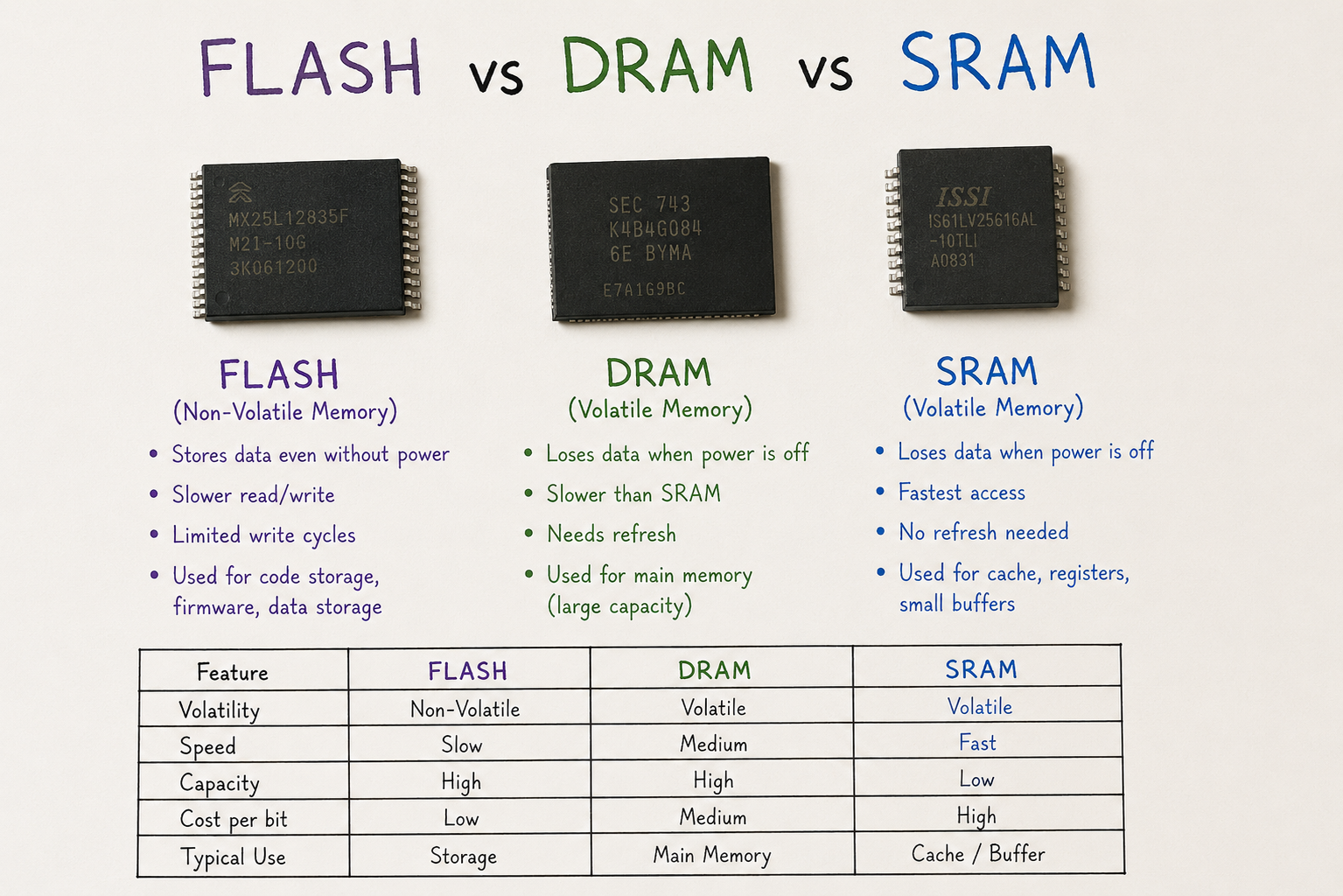
The comparison of Flash Memory vs DRAM vs SRAM is essentially the story of these three levels: the cache (SRAM), the working memory (DRAM), and the storage (Flash). Most embedded systems need at least two of these three technologies — many need all three.
The first DRAM chip — the Intel 1103 — was introduced in 1970 and stored just 1,024 bits. Modern LPDDR5 memory dies contain hundreds of billions of transistors and operate at over 50 Gbps per package. The physics are the same; the scale is almost incomprehensible.
Volatile vs Non-Volatile Memory — The Foundational Divide
The single most important characteristic of any memory technology is whether it is volatile or non-volatile.
Volatile memory loses its content when power is removed. Both SRAM and DRAM are volatile. They require continuous power to maintain stored data. When your system powers down, everything in volatile memory is gone.
Non-volatile memory retains its content without power. Flash memory is non-volatile. Data written to Flash survives power cycles, making it suitable for firmware storage, configuration data, and persistent file systems.
This single characteristic drives the entire memory architecture of every embedded system. Non-volatile memory holds the code and data that define the system's identity and behaviour. Volatile memory provides the fast, flexible working space where that code executes and manipulates data at runtime.
Every embedded system has at least one non-volatile memory (for code/config persistence) and almost always a volatile memory (for runtime execution). Understanding how Flash, DRAM, and SRAM each serve these roles is the foundation of memory architecture.
SRAM — Static RAM
The fastest, most power-hungry, most expensive memory per bit
3.1 How SRAM Works
SRAM stores each bit using a 6-transistor (6T) bistable latch — a pair of cross-coupled inverters that hold a logic state (0 or 1) as long as power is applied. There is no capacitor to charge and no need to refresh the state; the transistors actively maintain the stored value. This is the origin of the term "static" — the cell state is stable without any action required.
Because the storage element is a latch rather than a capacitor, SRAM can be read and written at very high speeds without the overhead of refresh cycles. Modern SRAM access times range from sub-nanosecond for embedded cache SRAM to 10–20 ns for standalone SRAM ICs.
3.2 Performance and Characteristics
3.3 When to Use SRAM
SRAM is the memory you reach for when speed is paramount and capacity requirements are modest. Its primary roles in embedded systems are:
-
→CPU caches (L1/L2/L3): The fundamental use case. Every modern microprocessor and many Cortex-M microcontrollers integrate SRAM as on-chip cache, giving the processor near-instant access to frequently used instructions and data.
-
→On-chip SRAM in MCUs: Virtually all microcontrollers integrate SRAM on-chip as their primary working memory — from 2 KB in small 8-bit MCUs to hundreds of KB in Cortex-M7 devices. This on-chip SRAM operates at CPU speed with zero wait states.
-
→Frame buffers in display controllers: Where fast random-access write speed is needed for pixel rendering in embedded GUI and display systems.
-
→Networking packet buffers: Low-latency packet processing requires deterministic, fast memory access that DRAM's refresh cycle cannot guarantee.
-
→Battery-backed retention memory: Small SRAM blocks backed by a supercapacitor or coin cell can retain critical data through unexpected power outages — useful for metering, industrial control, and safety systems.
If your microcontroller already has adequate on-chip SRAM for your stack, heap, and data structures, adding external SRAM is rarely necessary. Evaluate your firmware's actual memory footprint before committing to external memory — it often adds cost and complexity you do not need.
DRAM — Dynamic RAM
High-density, cost-effective working memory — with a refresh tax
4.1 How DRAM Works
DRAM stores each bit as a charge on a tiny capacitor paired with a single access transistor — a 1T1C (one transistor, one capacitor) cell. This is dramatically more compact than SRAM's 6T cell, which is why DRAM achieves far higher density at lower cost per bit.
The fundamental problem with capacitors is that they leak. The charge representing a stored '1' slowly dissipates through the transistor and substrate, meaning the data degrades over time. To prevent data loss, every DRAM cell must be periodically re-read and recharged — a process called refresh. This refresh operation happens automatically every 32–64 ms for standard DRAM, consuming power and briefly interrupting normal memory access.
This is the origin of the term 'dynamic' — the memory state must be actively maintained. It is both DRAM's central limitation and the engineering trade-off that makes its density advantage possible.
4.2 Performance and Characteristics
DRAM Variants Worth Knowing
4.3 When to Use DRAM
DRAM becomes necessary when your system needs more working memory than on-chip SRAM can provide — which means almost any system running an RTOS with dynamic memory allocation, and certainly any system running Linux, Android, or a full GUI stack.
-
→Embedded Linux/Android systems: DRAM is non-negotiable. The OS kernel, user-space processes, network stacks, and application memory all reside in DRAM. Minimum practical size is 128 MB; most modern embedded Linux designs use 256 MB – 2 GB.
-
→Application processors (i.MX, AM335x, RK3399): These SoCs expect external LPDDR DRAM as their primary memory. The DRAM controller is built into the SoC; DRAM is an external IC in the BOM.
-
→Video and camera buffers: Full-resolution video frame buffers at 1080p60 require 50+ MB of frame buffer memory — well beyond what on-chip SRAM can provide.
DRAM is not suitable as a direct replacement for SRAM in timing-critical applications. The row activation latency (tRCD + tCL, typically 10–40 ns) and the non-deterministic interruption during refresh cycles make DRAM unsuitable for hard real-time memory accesses.
Flash Memory
With write endurance limits that demand careful management
Flash memory stores data by trapping electrons in the floating gate (or charge trap) of a modified transistor structure. Unlike SRAM and DRAM, no power is needed to maintain the stored state — the trapped charge remains stable for years without any supply voltage.
Writing to Flash requires erasing first (setting cells to '1'), then programming selected cells to '0' by injecting charge into the floating gate through Fowler-Nordheim tunneling or hot-carrier injection. This erase-before-write constraint means Flash cells have a finite write endurance — typically 10,000–100,000 erase cycles.
5.1 NOR Flash vs NAND Flash
Flash memory comes in two fundamentally different internal architectures — NOR and NAND — with very different performance profiles and use cases:
NOR Flash
NAND Flash
5.2 Performance and Characteristics
For MCU-based designs with firmware under 16 MB, QSPI NOR Flash connected via SPI or QSPI interface is the go-to solution — fast enough for XIP (with caching), simple to program, and widely available. Map your firmware's memory footprint carefully before selecting Flash capacity, and add at least 50% headroom for future updates.
Flash Memory vs DRAM vs SRAM — The Complete Side-by-Side
With all three technologies understood in depth, here is the definitive comparison across the parameters that matter most to embedded developers and system architects:
| Parameter | SRAM | DRAM | Flash (NOR / NAND) |
|---|---|---|---|
| Storage mechanism | 6T bistable latch | 1T1C capacitor charge | Floating gate charge trap |
| Volatile? | Yes — lost on power off | Yes — lost on power off | No — retained without power |
| Refresh needed? | No | Yes — every 32–64 ms | No (write endurance limited) |
| Read latency | < 1 ns (cache) / 10–45 ns | 10 – 100 ns + row latency | NOR: 50–100 ns / NAND: 10–100 µs |
| Write latency | < 1 ns – 45 ns | 10 – 100 ns | Milliseconds (erase required) |
| Write endurance | Unlimited | Unlimited | 10K – 100K P/E cycles |
| Random byte access | Full — any address | Full — any address | NOR: Yes / NAND: Page-based only |
| Execute in place | Yes | Yes (with latency) | NOR: Yes / NAND: No |
| Cell density | Low (6 transistors/bit) | Very high (1T1C) | NAND: Highest / NOR: Medium |
| Cost per bit | Most expensive | Moderate | NAND: Cheapest / NOR: Moderate |
| Typical capacity | KB to a few MB | MB to GB | NOR: KB–MB / NAND: GB–TB |
| Power (standby) | Very low | Low–moderate (refresh current) | Near zero |
| Power (active) | High | Moderate | High during write/erase |
| Primary role | Cache, working buffer, on-chip RAM | OS/app working memory | Firmware, file system, data storage |
Memory Hierarchy in Practice: Real System Examples
Abstract comparisons only go so far. Let's walk through two real embedded system architectures and see exactly how Flash Memory vs DRAM vs SRAM plays out in practice.
Flash Memory vs DRAM vs SRAM is rarely a choice between alternatives — it is a question of how to combine all three in the right proportions for your specific system's performance, power, and cost requirements.
Choosing the Right Memory: Decision Framework
Use this framework to systematically select the right memory technologies for your next embedded design:
Emerging Memory Technologies Worth Watching
The Flash Memory vs DRAM vs SRAM landscape is not static. Several emerging memory technologies are changing the trade-off space in ways embedded developers and system architects should be aware of:
FRAM (Ferroelectric RAM)
FRAM combines non-volatility with SRAM-like read/write speeds and virtually unlimited endurance (>1014 cycles). It is an ideal replacement for Flash or EEPROM in high-write-cycle applications — smart metering, industrial data logging, wearable health monitors. Currently limited to small capacities (up to ~8 Mbit in standalone ICs).
MRAM (Magnetoresistive RAM)
MRAM stores data in magnetic tunnel junctions rather than charge — offering non-volatility, SRAM-comparable speed, and effectively unlimited endurance. Embedded MRAM (eMRAM) is being integrated into newer MCU generations (STM32U5, Renesas RA family) as a replacement for embedded Flash, offering faster write speeds and no endurance concerns.
ReRAM and PCM
Resistive RAM (ReRAM) and Phase Change Memory (PCM) are storage-class memory technologies sitting between Flash and DRAM in the performance/persistence trade-off space. Intel Optane (PCM-based) demonstrated the concept commercially in data centre applications. In embedded contexts, these technologies remain largely in development.
For a deeper academic foundation, the IEEE Solid-State Circuits Society's educational resources and JEDEC memory standards documentation are authoritative references widely used by semiconductor engineers and system architects globally.
FAQ — Flash Memory vs DRAM vs SRAM
Final Thoughts
The comparison of Flash Memory vs DRAM vs SRAM is one of the most foundational topics in embedded systems architecture — and one that rewards deep understanding. Each technology's characteristics are a direct consequence of its physics: how electrons are stored, how they are accessed, and what happens when power is removed.
SRAM gives you speed and determinism at the cost of density and price. DRAM gives you scalable capacity at moderate cost, with the refresh tax and latency implications you must design around. Flash gives you non-volatile persistence with write endurance limits that demand careful management.
Most real systems need all three — and the skill of the architect lies in knowing exactly where to place each one in the hierarchy. When you are ready to select and source memory components for your next embedded design, explore Indus Technologies' component range or submit a bulk quote for your BOM.
-

-

November 27, 2025
Connecting the Dots: How Electronic Components Work Together in Devices -

November 27, 2025
How reliable is your electronics components supplier