

From Bare Board to Finished Product

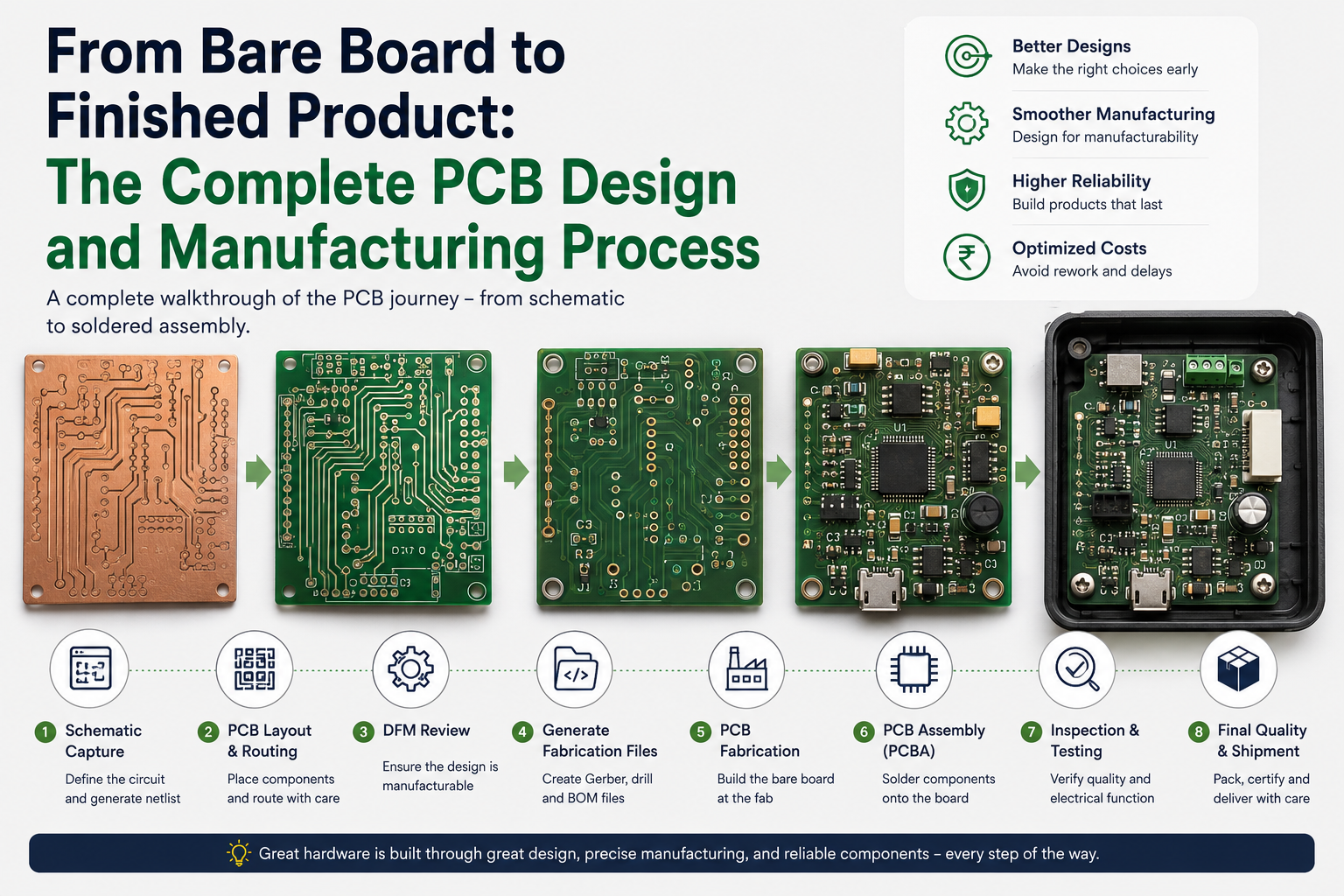
From Bare Board to Finished Product: The Complete PCB Design and Manufacturing Process
Every electronic product you have ever used — your laptop, your phone, your car's ECU, the smart meter on your wall — started life as a blank idea on someone's desk. At the centre of almost every one of these products is a printed circuit board: a precisely engineered layer of copper, fibreglass, and solder that holds everything together and makes it work.
The PCB design and manufacturing process is a fascinating journey that spans electrical engineering, materials science, chemistry, and precision manufacturing. It is also a process that product developers need to understand deeply — because decisions made in the earliest design stages will ripple through to cost, reliability, lead time, and manufacturability long after the first prototype is built. This guide walks you through the complete process, phase by phase — from initial schematic capture all the way to the final assembled and tested product. Browse our complete range of electronic components for PCB assembly at Indus Technologies.
"A PCB is not just a substrate for components — it is an engineered system. The way traces are routed, layers are stacked, and pads are sized will determine whether a product works reliably for years or fails in the field within months."
Table of Contents
- Understanding the PCB — A Quick Overview
- The Complete Process at a Glance
- Phase 1: Schematic Capture
- Phase 2: PCB Layout and Routing
- Phase 3: Design for Manufacturability (DFM) Review
- Phase 4: Generating Fabrication Files
- Phase 5: PCB Fabrication
- Phase 6: PCB Assembly (PCBA)
- Phase 7: Inspection and Testing
- Phase 8: Final Quality and Shipment
- Pre-Production Checklist
- FAQ
1. Understanding the PCB — A Quick Overview
A printed circuit board mechanically supports and electrically connects electronic components using conductive copper traces, pads, and vias etched or deposited onto a non-conductive substrate. The most common substrate material is FR-4 — a glass-reinforced epoxy laminate that offers a good balance of mechanical strength, thermal stability, and electrical insulation.
PCBs range from single-layer boards (one copper layer on one side) to highly complex multilayer boards with 16, 32, or even more layers of copper separated by insulating prepreg material. The number of layers is one of the primary drivers of cost, complexity, and capability.
| Layer Count | Typical Use Case | Complexity & Cost |
|---|---|---|
| 1–2 layers | Simple circuits, hobby electronics, basic power supplies | Lowest cost, easiest to design |
| 4 layers | Microcontroller boards, IoT devices, consumer electronics | Moderate — dedicated power/ground planes |
| 6–8 layers | Smartphones, laptops, industrial controllers | Higher — controlled impedance, more routing freedom |
| 10–16+ layers | High-speed processors, networking equipment, RF boards | Specialist — HDI, blind/buried vias, fine pitch |
Understanding which layer count your design needs is one of the first decisions in the PCB design and manufacturing process — and it depends on signal count, routing density, power requirements, and impedance control needs.
⚡ Did you know? The global PCB market was valued at over $75 billion in 2024. India's domestic PCB manufacturing capacity is growing rapidly, driven by the government's PLI (Production Linked Incentive) scheme for electronics manufacturing — making local PCB sourcing increasingly competitive for Indian product companies.
2. The Complete PCB Design and Manufacturing Process at a Glance
The journey from concept to finished PCB assembly follows a logical sequence of eight major phases. Each phase builds on the previous one, and errors at any stage can propagate — becoming increasingly expensive to fix as you move forward. The industry maxim holds firmly here: fix it in the schematic, not in the fab.
- Phase 1: Schematic Capture — translate the circuit design into a netlist
- Phase 2: PCB Layout and Routing — place components and route copper connections
- Phase 3: DFM Review — verify the design can be manufactured reliably at cost
- Phase 4: Fabrication File Generation — produce Gerber, drill, and BOM files
- Phase 5: PCB Fabrication — manufacture the bare board at the fab house
- Phase 6: PCB Assembly (PCBA) — solder components onto the bare board
- Phase 7: Inspection and Testing — verify every board works to specification
- Phase 8: Final Quality and Shipment — pack, certify, and deliver
3. Phase 1: Schematic Capture — Where Everything Begins
The schematic is the logical blueprint of your circuit. It shows every component, every connection, and every signal — but without any concern for physical placement or board shape. A schematic is to a PCB what an architectural plan is to a building: it defines what must be true, not yet how it will be physically arranged.
Schematics are created in EDA (Electronic Design Automation) tools. Popular choices include KiCad (free and open-source), Altium Designer (industry standard in professional product development), Cadence OrCAD, and EasyEDA (browser-based, popular for quick prototyping).
Good schematic hygiene at this stage pays dividends throughout the entire PCB design and manufacturing process. Every component must be assigned the correct symbol, an accurate footprint, and a real-world part number that can be purchased. The netlist — the output of the schematic that tells the PCB layout tool which pads must be connected — is only as good as the schematic it comes from.
Key outputs: Schematic PDF for review, netlist file, Bill of Materials (BOM) draft with component references and values.
???? Pro Tip: Number your schematic pages logically and add a title block with revision, date, and designer name. When you are debugging a failure six months later, these details save significant time.
4. Phase 2: PCB Layout and Routing — Turning Logic into Geometry
PCB layout is where the circuit becomes physical. The schematic's netlist is imported into the PCB editor, and the engineer's job is to place every component in the right location, in the right orientation, and then route copper traces to make all the required connections while respecting electrical, thermal, and mechanical constraints.
4.1 Stack-Up and Layer Planning
For multilayer boards, the first step is defining the stack-up: how many copper layers, what order, what thickness of core and prepreg between them, and what the overall board thickness should be. A well-designed stack-up provides dedicated power and ground planes (dramatically reducing noise and EMI), controls trace impedance for high-speed signals, and simplifies routing by giving more copper layers to work with.
4.2 Component Placement
Component placement is arguably the most important step in the entire layout. A good placement strategy groups related components together, keeps high-speed signal paths short, positions decoupling capacitors as close as physically possible to their ICs, respects the thermal hierarchy (high-power components near heatsinks or PCB edges), and considers the mechanical requirements of connectors, mounting holes, and enclosure fit.
⚠ Watch Out: Do not rush component placement to get to routing faster. 80% of routing problems are caused by poor placement decisions. Time invested in placement is always returned tenfold in routing ease and signal integrity.
4.3 Trace Routing
Routing is the process of drawing copper traces to connect component pads according to the netlist. Critical signals — high-speed differential pairs, clock lines, RF traces — are routed first and with strict adherence to length matching, impedance control, and shielding rules. Power and ground planes handle the distribution of supply voltages with minimal resistance and inductance.
4.4 Design Rule Check (DRC)
Once layout is complete, the DRC automatically checks that every trace, pad, via, and copper pour meets the minimum spacing, width, and clearance rules specified for the target fabrication process. Passing DRC is necessary but not sufficient — it confirms the board can be manufactured, but does not guarantee it will function correctly.
Tools commonly used: Altium Designer, KiCad PCB Editor, Cadence Allegro, Zuken CR-8000, EasyEDA.
5. Phase 3: Design for Manufacturability (DFM) Review
A PCB that is electrically correct but manufacturing-unfriendly will cost more, take longer, and yield less. DFM (Design for Manufacturability) review is the process of examining the layout through the lens of the factory — checking whether the design respects the capabilities and preferences of the fabrication and assembly process.
DFM covers fabrication concerns (minimum trace width, minimum drill size, annular ring size, via tenting, solder mask clearance) and assembly concerns (component orientation for reflow, sufficient clearance for pick-and-place nozzles, fiducial marker placement, test point accessibility, panel array design for production efficiency). Many PCB fab houses offer DFM review as part of their quoting process.
Common DFM issues to check:
- Via-in-pad without proper filling (causes solder wicking in SMT assembly)
- Components placed too close to board edge (routing and depanelling issues)
- Insufficient copper-to-edge clearance (risk of shorts after routing/scoring)
- Missing or misplaced fiducial markers (prevents accurate pick-and-place calibration)
- Non-standard drill sizes (increases tooling cost and lead time)
6. Phase 4: Generating Fabrication Files — The Handshake Between Design and Factory
Once the design is finalized, verified, and DFM-approved, it is exported as a set of fabrication files that the PCB manufacturer uses to build the board. This package is the complete instruction set for manufacturing.
- Gerber files (RS-274X format): One file per copper layer, one for solder mask (top and bottom), one for silkscreen (top and bottom), one for board outline. Each Gerber file is a 2D vector description of everything present on that layer.
- Excellon drill file: Specifies the location, size, and type (plated through-hole, non-plated, blind/buried) of every drill hit on the board.
- Assembly drawings and BOM: Centroid/pick-and-place file (component X/Y coordinates and rotation), assembly drawings, and the final BOM with manufacturer part numbers and acceptable substitutes.
- IPC-2581 (emerging standard): A single-file format that replaces the multiple-file Gerber + drill package with a complete, intelligent board description.
???? Pro Tip: Always review your Gerber files in a free Gerber viewer (Gerbv, KiCad's Gerber viewer, or the fab house's online preview) before submitting. What looks correct in your EDA tool does not always export perfectly.
7. Phase 5: PCB Fabrication — From Files to Physical Board
PCB fabrication is the manufacturing process that transforms Gerber files into physical bare boards — copper-clad fibreglass panels with all the traces, holes, and surface treatments precisely applied. Here is how it works, step by step.
7.1 Substrate and Copper Lamination
The process begins with sheets of FR-4 core (pre-cured fibreglass) clad with copper foil on one or both sides. The copper thickness is specified by the designer — typically 1oz/ft² (35µm) for standard designs, or 2oz/ft² for high-current applications.
7.2 Photolithography and Etching
Each copper layer is patterned using photolithography: a photoresist is applied to the copper, exposed to UV light through a film mask (created from the Gerber file), and developed. The unexposed resist is washed away, leaving the copper that should be removed exposed. Chemical etching — typically using ferric chloride or ammonium persulfate — removes the exposed copper, leaving only the designed traces and pads.
7.3 Layer Registration and Lamination
For multilayer boards, individual etched layers are aligned using precision registration pins, separated by sheets of prepreg (semi-cured fibreglass), and bonded under heat and pressure in a lamination press. This fuses all the layers into a single, solid multilayer board.
7.4 Drilling
CNC drilling machines drill through-holes and via holes to the exact positions and diameters specified in the drill file. High-density designs may use laser drilling for microvias (holes smaller than 150µm, used in HDI boards). Typical mechanical drill accuracy is ±0.05mm.
7.5 Via Plating, Surface Finishing, Solder Mask and Silkscreen
Drilled holes are plated with copper using an electroless and electrolytic copper plating process, creating the conductive barrel that connects layers through vias. The board surface is then finished — common surface finishes include HASL (Hot Air Solder Level), ENIG (Electroless Nickel Immersion Gold, preferred for fine-pitch SMD), OSP (Organic Solderability Preservative), and ENEPIG for high-reliability applications.
Solder mask — the green (or blue, red, black) coating you see on finished PCBs — is a liquid photoimageable polymer applied over the entire board and selectively exposed to leave openings only at solder pads. It prevents accidental solder bridges during assembly and protects copper traces from oxidation. Silkscreen printing adds component reference designators, polarity markers, logos, and other text.
8. Phase 6: PCB Assembly (PCBA) — Populating the Board
The bare fabricated board is just a substrate until components are soldered onto it. PCB assembly (PCBA) is the process of attaching all electronic components — transforming the bare board into a functional circuit.
8.1 Solder Paste Application
For SMT assembly, solder paste — a mixture of fine solder powder suspended in flux — is applied to all SMT pads using a stainless steel stencil. The stencil apertures precisely match the SMT pad positions on the board. A squeegee is drawn across the stencil, pressing solder paste through the apertures and depositing a controlled volume of paste on each pad.
8.2 SMT Component Placement
Pick-and-place machines — high-speed robotic systems with vision-guided placement heads — pick SMD components from tape reels or trays and place them onto the solder paste deposits at precise coordinates and orientations. Modern pick-and-place systems can place 20,000–100,000 components per hour with placement accuracy of ±0.025mm.
8.3 Reflow Soldering
The populated board passes through a reflow oven — a precisely profiled thermal tunnel with multiple heating zones. The solder paste goes through four stages: preheat (slowly raises temperature to activate flux and remove moisture), soak (stabilizes the board temperature), reflow (raises above the solder liquidus temperature, typically 220–260°C for lead-free SAC305 solder, melting the paste and forming solder joints), and cooling (controlled cool-down to solidify the joints).
8.4 Through-Hole and Selective Soldering
Through-hole components — connectors, large electrolytic capacitors, transformers — are inserted manually or by robotic insertion machines after SMT reflow, then soldered using wave soldering or selective soldering (a programmable nozzle applies solder precisely to specific through-hole locations without affecting nearby SMT components).
⚠ Watch Out: Component reel traceability is critical at this stage. If counterfeit or incorrect components enter the pick-and-place process, failures may not surface until field deployment. Sourcing all components from authorized, documented supply chains is essential for manufacturing yield and product reliability.
9. Phase 7: Inspection and Testing — Trust but Verify Every Board
Assembly does not end when soldering is complete. Every assembled board must be inspected and tested before shipment. The depth of inspection depends on the product's risk profile and production volume.
Automated Optical Inspection (AOI)
AOI machines use high-resolution cameras and image processing to inspect every solder joint and component on the assembled board, comparing against a golden reference. AOI catches missing components, wrong components, solder bridges, insufficient solder, tombstoning, and polarity errors — at production line speed.
X-Ray Inspection (AXI)
For components with hidden solder joints — BGA (Ball Grid Array) packages, QFN, and other bottom-terminated components — AOI cannot see the solder joints at all. X-ray inspection (AXI) is the only way to verify solder joint quality for these devices, checking for voids, bridging, and missing balls.
In-Circuit Testing (ICT)
ICT uses a bed-of-nails fixture to contact every testable node on the PCB simultaneously, measuring component values, checking for shorts and opens, and verifying basic circuit functionality against known-good values. ICT has high capital cost but provides very high fault coverage for production volumes.
Functional Testing (FCT) and Flying Probe
Functional testing exercises the assembled board as a complete system — powering it up, sending test stimuli, and verifying that outputs are correct. For prototype and low-volume production where ICT fixture cost is not justified, flying probe testers use movable probe heads to contact test points sequentially — slower than ICT but requiring no custom fixture.
10. Phase 8: Final Quality and Shipment — Ready for the Real World
Boards that pass all inspections and tests move to the final stage: cleaning (if required), conformal coating (for harsh environment applications), final visual inspection, serialisation and labelling, and packaging for shipment.
Conformal coating — a thin protective film of acrylic, silicone, or urethane applied to the assembled board — protects against moisture, dust, chemical contamination, and vibration-induced fatigue. It is standard in automotive, aerospace, marine, and outdoor industrial applications.
Key documentation shipped with each order:
- Test report (ICT, AOI, FCT results per board or lot)
- Certificate of Conformance (CoC) from the assembly house
- Component traceability records (reel lot numbers, CoCs from component suppliers)
- First Article Inspection (FAI) report for new products or significant design changes
11. Pre-Production Checklist — PCB Design and Manufacturing Process
Before releasing your design for fabrication and assembly, verify each of the following:
| ✓ Design & Layout | |
|---|---|
| ☐ | Schematic fully reviewed and signed off — all nets named, all pins connected or intentionally unconnected (DNP noted) |
| ☐ | All components have verified footprints matched against actual component datasheet land patterns |
| ☐ | Stack-up defined and shared with the fabrication house — layer order, dielectric thickness, copper weight |
| ☐ | Controlled impedance traces calculated and constrained correctly in the layout |
| ☐ | Decoupling capacitors placed within 0.5mm of each IC power pin |
| ☐ | Differential pairs length-matched to within required tolerance |
| ☐ | DRC passed with zero errors at the target fab's design rules |
| ☐ | Fiducial markers present (minimum 3, on top copper layer, in corners or edges) |
| ☐ | Board outline closed with no gaps — verified in Gerber viewer |
| ☐ | Silkscreen references legible, not overlapping pads, scaled appropriately |
| ☐ | Mounting holes correct size and clearance, copper-free keepout if non-metallic |
| ✓ Fabrication Files & BOM | |
|---|---|
| ☐ | Gerber files reviewed in independent viewer (Gerbv, KiCad, fab house preview) |
| ☐ | Drill file verified — all holes present, layer correspondence correct |
| ☐ | BOM contains manufacturer name, manufacturer part number, and quantity for every line |
| ☐ | Approved alternatives or DNP status noted for every component |
| ☐ | Assembly drawing shows component orientation, polarity markers, and connector pin 1 |
| ☐ | Pick-and-place centroid file generated and verified for correct reference designator mapping |
| ☐ | Surface finish specified (HASL, ENIG, OSP) — appropriate for component pitch and application |
| ☐ | Solder mask expansion values checked — no mask opening on traces, adequate pad coverage |
| ☐ | IPC class specified (Class 2 for commercial, Class 3 for high-reliability applications) |
Components Are Only as Good as Their Source
The quality of a finished PCB assembly depends not just on the design and manufacturing process — it depends equally on the quality and authenticity of the components that go onto the board. Indus Technologies supplies a complete range of components for PCB assembly — from passive components (resistors, capacitors, inductors) to power semiconductors and ICs to connectors — all sourced through authorized channels with full traceability documentation.
Need a full BOM quoted for your next PCB production run? Submit a bulk quote request and our team will get back to you with availability, pricing, and lead times across your entire component list. For a deeper dive into component authentication, see our related post: How to Avoid Counterfeit Electronic Components When Sourcing.
12. FAQ — PCB Design and Manufacturing Process
Final Thoughts
The PCB design and manufacturing process is one of the most intricate and satisfying engineering disciplines in modern electronics. Every phase — from the first schematic symbol to the last test report — requires careful attention, clear communication, and respect for the constraints of the physical world.
Understanding this process end-to-end makes you a better engineer, a more effective project manager, and a more informed procurement professional. It helps you ask the right questions of your fab and assembly partners, make better architecture decisions early, and avoid the expensive mistakes that come from treating PCB manufacturing as a black box.
And it starts with one thing: knowing that great hardware requires great components. Designed correctly, manufactured precisely, and sourced reliably — every step of the way. When you are ready to source components for your next PCB build, explore Indus Technologies' component catalog or submit your BOM for a bulk quote. Genuine parts, authorized sourcing, full traceability — ready for your production process.
-

-

November 27, 2025
Connecting the Dots: How Electronic Components Work Together in Devices -

November 27, 2025
How reliable is your electronics components supplier